
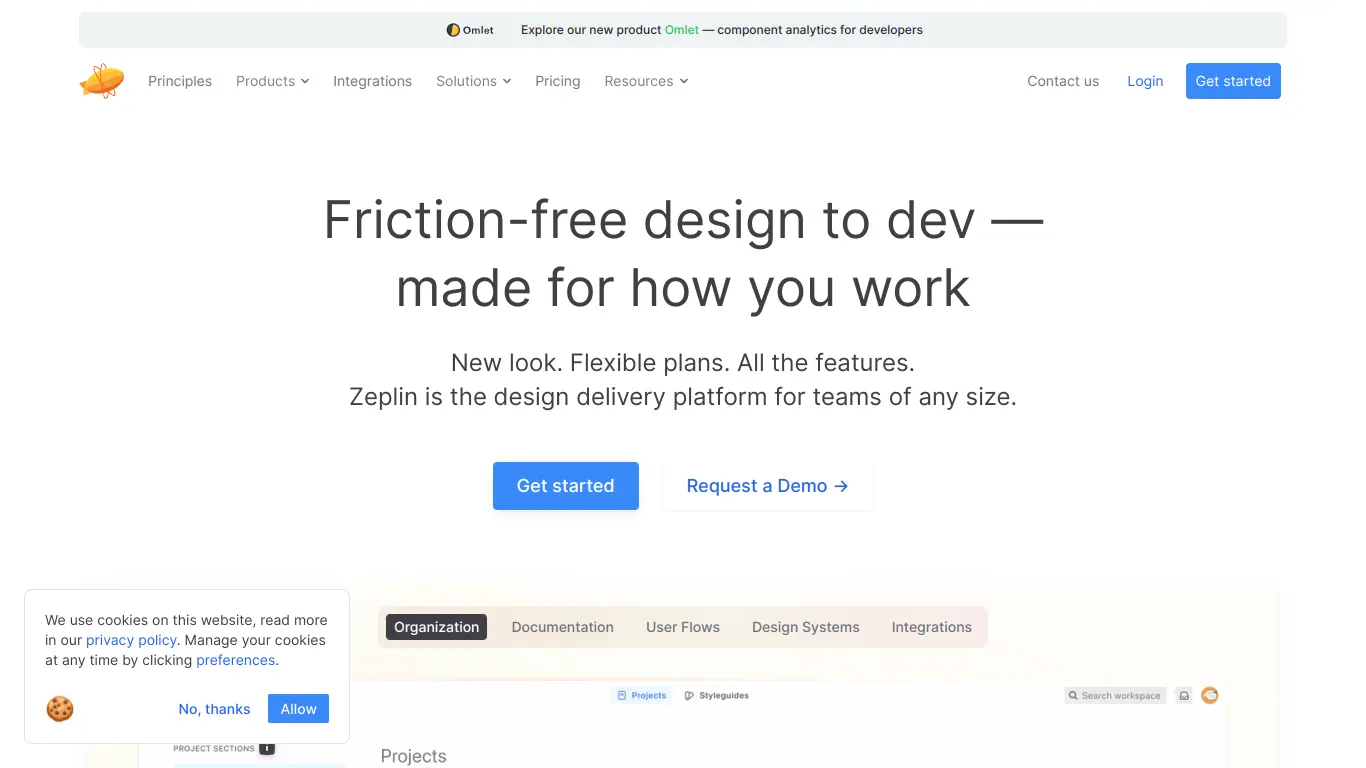
Zeplin streamlines design handoff by transforming design files into developer-ready assets with precise specs, bridging designer-developer gaps.
Introduction to Zeplin
Have you ever been part of a design team that struggles with the handoff process? Designers create beautiful mockups, but developers struggle to implement them accurately. Communication breaks down, project timelines extend, and frustration builds on both sides. This disconnect between design and development is a common pain point that can derail even the most promising projects.
Enter Zeplin – a game-changing collaboration tool that bridges the gap between designers and developers, making the handoff process seamless and efficient.
What is Zeplin and its Purpose?
Zeplin is a dedicated collaboration and handoff platform that transforms design files into specifications, guidelines, and resources that developers can easily understand and implement. Created to solve the age-old friction between design and development teams, Zeplin serves as a central hub where designs are translated into development-ready assets with precise specifications.
The platform works as an intermediary layer between design tools (like Figma, Sketch, Adobe XD, and Photoshop) and the actual development environment. Designers upload their completed work to Zeplin, which then automatically generates all the necessary code snippets, style guides, and assets that developers need to bring those designs to life.
Zeplin’s purpose is straightforward: to eliminate the ambiguity and miscommunication that typically occurs during the design handoff process, resulting in faster development cycles, fewer revisions, and pixel-perfect implementation of designs.
Who is Zeplin Designed For?
Zeplin caters to several key stakeholders in the product development ecosystem:
- Designers: Whether you’re a UI/UX designer working on websites, mobile apps, or software interfaces, Zeplin helps you communicate your design intent clearly without having to create extensive documentation.
- Developers: Front-end developers and engineers who need to transform designs into functional code will find Zeplin invaluable for extracting exact measurements, color codes, fonts, and assets.
- Product Managers: Those overseeing the product development process benefit from Zeplin’s ability to streamline workflow and ensure design implementation accuracy.
- Design Teams: From small startups to enterprise-level design departments, Zeplin scales to support teams of all sizes working on projects of varying complexity.
- Agencies: Design and development agencies use Zeplin to maintain clear communication with clients and ensure delivered products match approved designs exactly.
The tool is especially valuable for organizations that have separate design and development teams or those working in remote/distributed environments where face-to-face communication isn’t always possible.
Getting Started with Zeplin: How to Use It
Getting up and running with Zeplin is straightforward:
- Sign up for an account: Visit Zeplin.io and create an account. You can start with the free plan to test the waters.
- Install the appropriate plugin: Depending on your design tool of choice (Sketch, Figma, Adobe XD, or Photoshop), install the corresponding Zeplin plugin.
- Create a project: In Zeplin, create a new project and select the platform you’re designing for (web, iOS, Android, or macOS).
- Export your designs: Using the plugin in your design tool, export your artboards or frames to your Zeplin project.
- Invite team members: Add your developers and other stakeholders to the project so they can access the specifications.
- Collaborate: Use Zeplin’s annotation and commenting features to provide additional context to specific elements of your design.
For designers, the workflow typically involves finalizing designs in their preferred tool, then using the Zeplin plugin to export those designs to a shared Zeplin project. For developers, it means accessing the Zeplin project, where they can inspect elements, copy code snippets, download assets, and reference design specifications as they build.
Zeplin’s Key Features and Benefits
Core Functionalities of Zeplin
Zeplin offers a robust set of features designed to streamline the design-to-development handoff process:
- Automatic Specs Generation: Zeplin automatically generates detailed specifications including dimensions, margins, and padding for every element in your designs.
- Code Snippets: The platform provides ready-to-use code snippets in CSS, Swift, Android XML, and other languages, saving developers from manual conversion.
- Asset Export: Automatically slices and exports assets in the appropriate formats and resolutions for different platforms (PNG, SVG, PDF, etc.).
- Style Guides: Creates centralized, living style guides that document colors, text styles, and components used across the project.
- Version Control: Tracks changes to designs over time, allowing teams to reference previous versions if needed.
- Collaborative Annotations: Enables team members to leave contextual comments directly on specific elements of the design.
- Component Libraries: Supports the creation and management of reusable components, facilitating consistent implementation across projects.
- Integration Capabilities: Connects with popular tools like Slack, Jira, and Trello to fit seamlessly into existing workflows.
Advantages of Using Zeplin
The benefits of incorporating Zeplin into your workflow extend beyond mere convenience:
- Reduced Development Time: By eliminating the guesswork from the implementation process, developers can work more efficiently, reducing overall development time by up to 50%.
- Improved Accuracy: Designs are implemented exactly as intended, reducing the number of revisions and back-and-forth communications.
- Enhanced Collaboration: Creates a single source of truth for both designers and developers, fostering better understanding between teams.
- Streamlined Communication: Reduces the need for lengthy explanation meetings and detailed documentation, as specifications are automatically generated.
- Consistent Implementation: Ensures design elements are consistently applied across different screens and platforms.
- Remote-Friendly Workflow: Facilitates smooth collaboration for distributed teams working across different time zones.
- Resource Optimization: Frees up designers’ time that would otherwise be spent creating redlines and specification documents.
Main Use Cases and Applications
Zeplin shines in several common scenarios:
- Website Development: Translating web designs into responsive code with accurate CSS specifications.
- Mobile App Creation: Ensuring iOS and Android implementations match design intent across various device sizes.
- Design System Management: Maintaining consistent design languages across large organizations and multiple products.
- Cross-Platform Products: Managing design consistency when developing for multiple platforms simultaneously.
- Agency-Client Collaboration: Providing clients with clear visualizations of how their products will be implemented.
- Iterative Development: Supporting agile workflows where designs evolve throughout the development process.
One notable example comes from Airbnb, where their design team used Zeplin to help manage and implement their extensive design system across multiple platforms, significantly reducing implementation inconsistencies.
Exploring Zeplin’s Platform and Interface
User Interface and User Experience
Zeplin’s interface is intentionally minimalist and intuitive, designed to keep the focus on the designs themselves rather than the tool. The layout consists of several key areas:
The Dashboard: Upon logging in, users see their projects organized by recency and relevance. Projects can be further organized using tags and folders.
Project View: When opening a project, screens are displayed in a grid or list format, making it easy to navigate between different designs.
Screen Inspector: Clicking on any screen opens the inspector view where the real magic happens:
- Left sidebar: Navigation between screens and sections
- Main canvas: The design itself, where elements can be selected
- Right sidebar: Detailed specifications for selected elements
- Bottom panel: Assets, code snippets, and comments related to the current selection
The experience is designed to be intuitive for both designers and developers. Designers will appreciate how their work is presented without distortion, while developers will find the systematic organization of specifications and assets aligned with their workflow needs.
The learning curve is remarkably shallow – most users report becoming proficient with Zeplin within a single day of use. The interface prioritizes discovery, with contextual tools appearing based on the selected elements rather than overwhelming users with permanent toolbars.
Platform Accessibility
Zeplin demonstrates impressive cross-platform versatility:
Desktop Applications:
- macOS native application
- Windows native application
Web Platform:
- Full-featured browser version accessible from any modern browser
Mobile Experience:
- iOS app for on-the-go reference (though with limited editing capabilities)
- Responsive web version accessible on tablets and smartphones
The platform is designed with accessibility in mind, offering keyboard shortcuts for power users and maintaining good contrast ratios for readability. The web version follows modern accessibility standards, making it usable with screen readers for users with visual impairments.
For teams working across different operating systems, Zeplin provides a consistent experience regardless of platform, ensuring that Mac-using designers can seamlessly collaborate with Windows-using developers.
Zeplin Pricing and Plans
Subscription Options
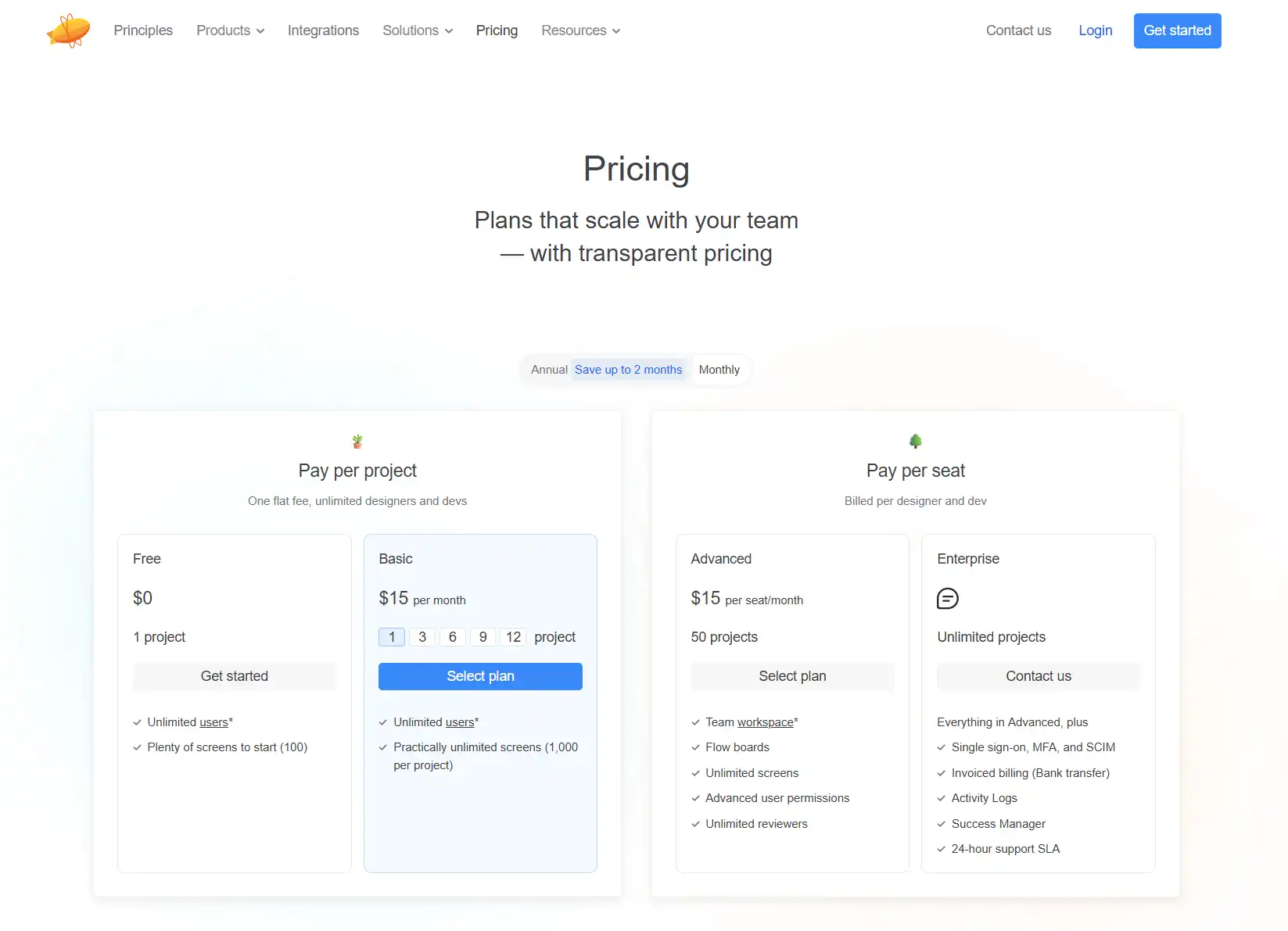
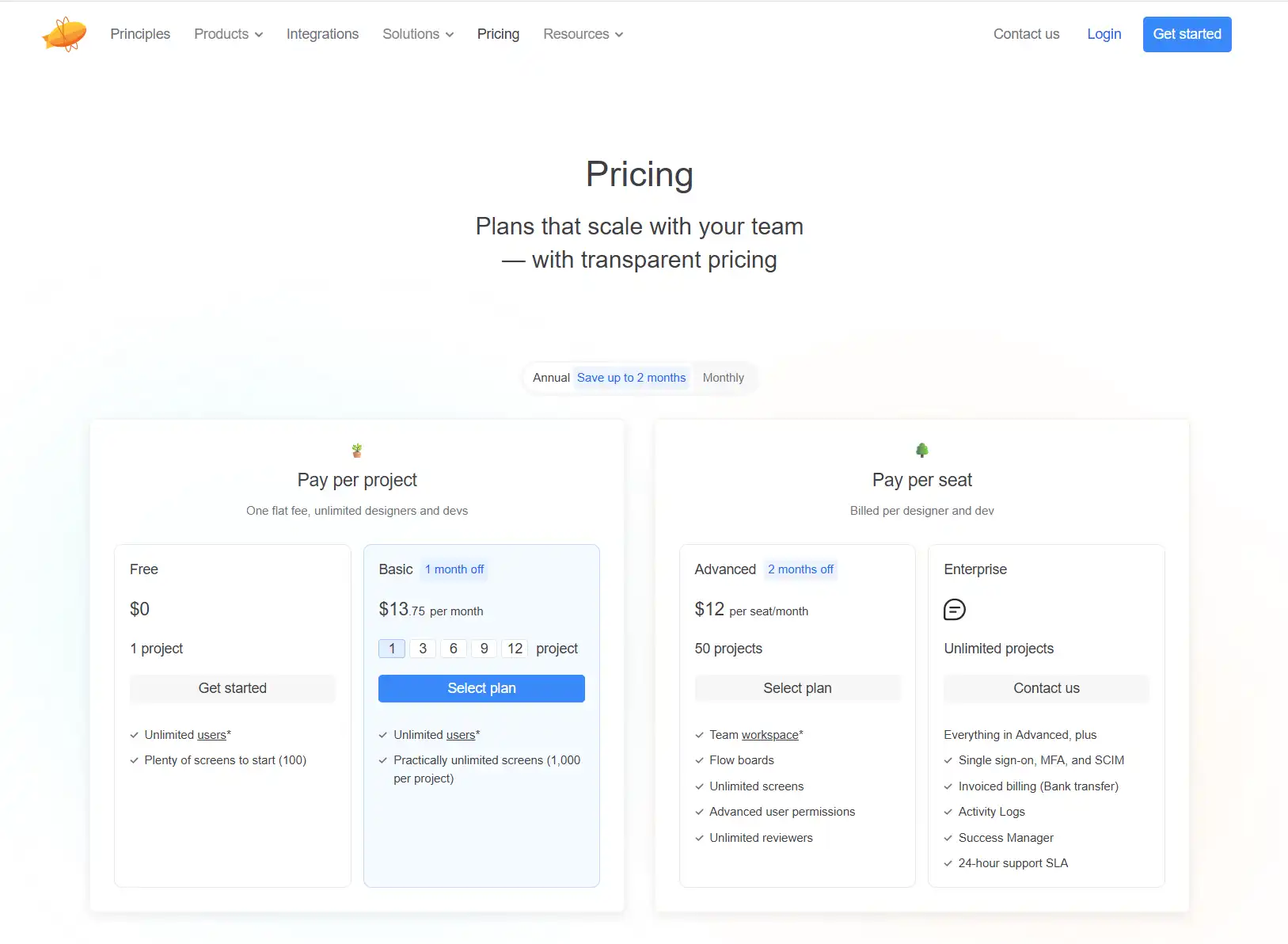
Zeplin offers a tiered pricing structure designed to accommodate teams of different sizes and needs:
Zeplin Reviews and User Feedback
Pros and Cons of Zeplin
Based on analysis of user feedback across various platforms, here’s a balanced view of Zeplin’s strengths and limitations:
Pros:
- ✅ Exceptional ease of use with minimal learning curve
- ✅ Significant time savings during design handoff
- ✅ High-quality code snippets that require minimal editing
- ✅ Excellent support for design systems and component libraries
- ✅ Reliable asset management and export
- ✅ Strong integration with major design tools
- ✅ Efficient comment and feedback system
Cons:
- ❌ Limited design editing capabilities (it’s primarily a handoff tool)
- ❌ Some users report occasional sync issues with design tools
- ❌ The free tier is quite limited with just one project
- ❌ Mobile apps have fewer features than desktop versions
- ❌ Not ideal for highly complex interactive prototyping
- ❌ Some advanced features are only available on higher-tier plans
User Testimonials and Opinions
Real feedback from design and development professionals reveals consistent themes:
“Zeplin has completely transformed our design handoff process. What used to take days now takes hours, and our implementation accuracy has improved dramatically.”
— Senior UI Designer at a SaaS company
“As a developer, Zeplin gives me everything I need to implement designs without constant back-and-forth with the design team. The CSS snippets alone save me hours every week.”
— Front-end Developer at a digital agency
“We evaluated several handoff tools, and Zeplin stood out for its simplicity and reliability. Our entire team was up and running within a day.”
— Product Manager at a fintech startup
According to G2 and Capterra reviews, Zeplin consistently scores above 4.5/5 stars, with particular praise for its ease of use and time-saving capabilities. Common criticisms center around pricing for smaller teams and occasional wish-list features rather than fundamental problems with the core functionality.
The tool receives especially high marks from cross-functional teams working in agile environments, where rapid iteration and clear communication between design and development are critical success factors.
Zeplin Company and Background Information
About the Company Behind Zeplin
Zeplin was founded in 2014 by Pelin Kenez and Berk Çebi, who experienced the design-to-development handoff problem firsthand while working at other companies. What began as a solution to their own workflow challenges quickly gained traction in the design community.
The company is headquartered in San Francisco, California, but maintains a distributed team with employees across multiple countries. Zeplin has raised approximately $1.2 million in venture funding, with backing from investors including Elad Gil, Daniel Gross, and FundersClub.
The founding philosophy behind Zeplin centers on the idea that designers and developers should be able to collaborate seamlessly, without translation barriers or misunderstandings. This principle continues to guide the company’s product development.
Since its launch, Zeplin has grown to serve over 4 million users across more than 150,000 organizations worldwide. The platform has become an industry standard in design handoff, used by companies ranging from small startups to Fortune 500 enterprises like Microsoft, Amazon, Airbnb, and Spotify.
The company maintains a strong commitment to product quality and user experience, regularly releasing updates and new features based on user feedback. Their development roadmap typically emphasizes integration capabilities, workflow improvements, and features that strengthen design systems management.
Zeplin Alternatives and Competitors
Top Zeplin Alternatives in the Market
Several other tools compete in the design handoff and collaboration space:
- Figma: Originally a design tool, Figma has expanded its developer handoff capabilities, allowing for some of the same inspection and asset extraction features directly within the platform.
- InVision: Offers Inspect mode for developer handoff along with prototyping and collaboration features.
- Abstract: Focuses on design version control and collaboration with integrated handoff features.
- Marvel: Combines prototyping with developer handoff capabilities.
- Avocode: Specializes in design handoff and code generation from various design formats.
- UXPin: Offers end-to-end design, prototyping, and handoff in a single platform.
- Sketch Measure: A free Sketch plugin that provides some basic handoff capabilities.
Zeplin vs. Competitors: A Comparative Analysis
How does Zeplin stack up against its main competitors? Let’s compare across key dimensions:
| Feature | Zeplin | Figma | InVision | Abstract |
|---|---|---|---|---|
| Primary Focus | Design Handoff | Design Creation & Collaboration | Prototyping & Collaboration | Version Control & Handoff |
| Learning Curve | Low | Medium | Medium | High |
| Code Snippet Quality | Excellent | Good | Good | Good |
| Design System Support | Strong | Excellent | Good | Good |
| Integrations | Extensive | Extensive | Extensive | Limited |
| Free Tier | Limited (1 project) | Generous | Limited | No |
| Starting Price | $6/user/month | $12/user/month | $7.95/user/month | $15/user/month |
Zeplin vs. Figma: While Figma provides an all-in-one solution for design and handoff, Zeplin offers more specialized handoff features and better code generation. Teams already using Figma may find its built-in handoff capabilities sufficient, while those using other design tools or requiring more advanced handoff features will benefit from Zeplin.
Zeplin vs. InVision: InVision provides stronger prototyping capabilities but less advanced handoff features. Zeplin focuses exclusively on making the handoff process seamless, resulting in more comprehensive specifications and better code output.
Zeplin vs. Abstract: Abstract excels at version control but has a steeper learning curve. Zeplin is more accessible to teams looking for a straightforward handoff solution without complex branching and merging workflows.
The ideal choice depends on your team’s specific workflow and existing tools. Zeplin remains the preferred option for teams seeking a dedicated, specialized handoff tool that integrates with various design platforms.
Zeplin Website Traffic and Analytics
Website Visit Over Time
Analyzing Zeplin.io’s traffic patterns reveals interesting insights about its market position:
Based on SimilarWeb data, Zeplin.io receives approximately 500,000-600,000 monthly visits, with a steady growth trajectory over the past year. Traffic patterns show regular weekly fluctuations, with higher usage during weekdays and drops during weekends, reflecting its use in professional workflows.
The site experienced notable traffic spikes following major feature releases, particularly after launching enhanced integration with Figma in early 2022, which resulted in a 15% increase in traffic within the following month.
Geographical Distribution of Users
Zeplin’s user base is truly global, with significant concentrations in:
- United States (25%)
- United Kingdom (11%)
- India (9%)
- Germany (7%)
- Brazil (6%)
- Canada (5%)
- Australia (4%)
- France (4%)
- Japan (3%)
- Other countries (26%)
This distribution highlights Zeplin’s popularity in major tech hubs and countries with significant design and development communities.
Main Traffic Sources
Zeplin’s website traffic comes from diverse channels:
- Direct Traffic: 42% (indicating strong brand recognition)
- Organic Search: 28% (keywords like “design handoff tool,” “zeplin design,” “developer handoff”)
- Referrals: 18% (primarily from design blogs, Figma, Sketch, and other design tool websites)
- Social Media: 7% (mainly Twitter and LinkedIn)
- Email: 3%
- Other Sources: 2%
The high percentage of direct traffic suggests that Zeplin has established strong brand recognition within its target market. A significant portion of referral traffic comes from integration partners, reinforcing the importance of Zeplin’s ecosystem connections.
Frequently Asked Questions about Zeplin (FAQs)
General Questions about Zeplin
Q: What exactly is Zeplin?
A: Zeplin is a collaboration platform that bridges the gap between designers and developers. It transforms designs from tools like Figma, Sketch, and Adobe XD into specifications, assets, and guidelines that developers can easily implement.
Q: Is Zeplin replacing design tools like Figma or Sketch?
A: No, Zeplin complements design tools rather than replacing them. Designers still create in their preferred design environment, then use Zeplin to hand those designs off to development teams with all the necessary specifications.
Q: Can Zeplin be used for all types of digital products?
A: Yes, Zeplin supports web, iOS, Android, and macOS projects. It’s suitable for websites, mobile applications, desktop software, and any other digital interface that needs to be implemented by developers.
Feature Specific Questions
Q: Which design tools does Zeplin integrate with?
A: Zeplin currently integrates with Figma, Sketch, Adobe XD, and Adobe Photoshop.
Q: Can developers get code snippets directly from Zeplin?
A: Yes, Zeplin automatically generates code snippets for CSS, Swift, Android XML, and other languages based on the design elements. These snippets can be customized and copied directly from the platform.
Q: Does Zeplin support design systems?
A: Absolutely. Zeplin’s Styleguides and Connected Components features allow teams to create and maintain comprehensive design systems with colors, text styles, and reusable components that remain consistent across projects.
Q: Can I use Zeplin for version control of designs?
A: Zeplin tracks versions of screens as they’re updated, allowing you to view historical versions. However, it’s not a full version control system like Git, and it doesn’t support branching or merging of designs.
Pricing and Subscription FAQs
Q: Is there a free version of Zeplin?
A: Yes, Zeplin offers a free plan that includes 1 project, unlimited screens, and collaboration with up to 3 team members.
Q: How does Zeplin’s pricing work for teams?
A: Zeplin’s team pricing is per-seat, meaning you pay for each user who needs access to Zeplin. Pricing starts at $6 per member per month (billed annually) for the Team plan.
Q: Can I switch between plans?
A: Yes, you can upgrade or downgrade your plan at any time. When upgrading, you’ll be immediately charged the prorated amount for the remainder of your billing cycle. When downgrading, the change takes effect at the end of your current billing cycle.
Support and Help FAQs
Q: What kind of support does Zeplin offer?
A: Zeplin provides email support for all users, with priority support for paid plans. The Organization and Enterprise plans include dedicated support channels. They also maintain extensive documentation and a knowledge base.
Q: Is there training available for Zeplin?
A: Zeplin offers documentation, video tutorials, and webinars to help teams get started. Enterprise customers can also receive customized onboarding sessions for their teams.
Q: Does Zeplin offer an API for custom integrations?
A: Yes, Zeplin provides a REST API that allows developers to access projects, screens, and other resources programmatically, enabling custom integrations with internal tools and workflows.
Conclusion: Is Zeplin Worth It?
Summary of Zeplin’s Strengths and Weaknesses
After a comprehensive analysis, here’s how Zeplin’s key attributes stack up:
Strengths:
- 🌟 Dramatically streamlines the design-to-development handoff process
- 🌟 Generates high-quality code snippets that save developers significant time
- 🌟 Intuitive interface with minimal learning curve
- 🌟 Strong support for design systems and component libraries
- 🌟 Excellent integration with major design tools
- 🌟 Robust collaboration features including contextual commenting
Weaknesses:
- ⚠️ Limited free tier may not be sufficient for professional use
- ⚠️ Not a complete solution for design creation or prototyping
- ⚠️ Mobile apps offer reduced functionality compared to desktop versions
- ⚠️ Occasional sync issues reported with some design tools
Final Recommendation and Verdict
Zeplin delivers exceptional value for design and development teams seeking to streamline their handoff process. The ROI becomes clear when you consider the time saved in specification documentation, asset preparation, and reduced back-and-forth communication.
For small teams or freelancers working on a single project, the free tier provides a good introduction, though you’ll quickly want to upgrade for professional work. The Team plan at $6 per member per month represents excellent value for most professional scenarios, with the cost easily offset by productivity gains.
Zeplin is particularly worth the investment for:
- Teams with separate design and development roles
- Organizations working on multiple platforms simultaneously
- Companies implementing design systems at scale
- Remote or distributed teams that need clear, asynchronous communication
The verdict? Zeplin is an essential tool for professional design and development workflows. While alternatives exist, Zeplin’s focused approach to solving the handoff problem, combined with its intuitive interface and high-quality output, makes it the gold standard in its category. For most teams, the efficiency gains and reduction in implementation errors will more than justify the subscription cost.
By bridging the designer-developer divide, Zeplin doesn’t just save time—it helps create better digital products through clearer communication and more accurate implementation of design intent.