
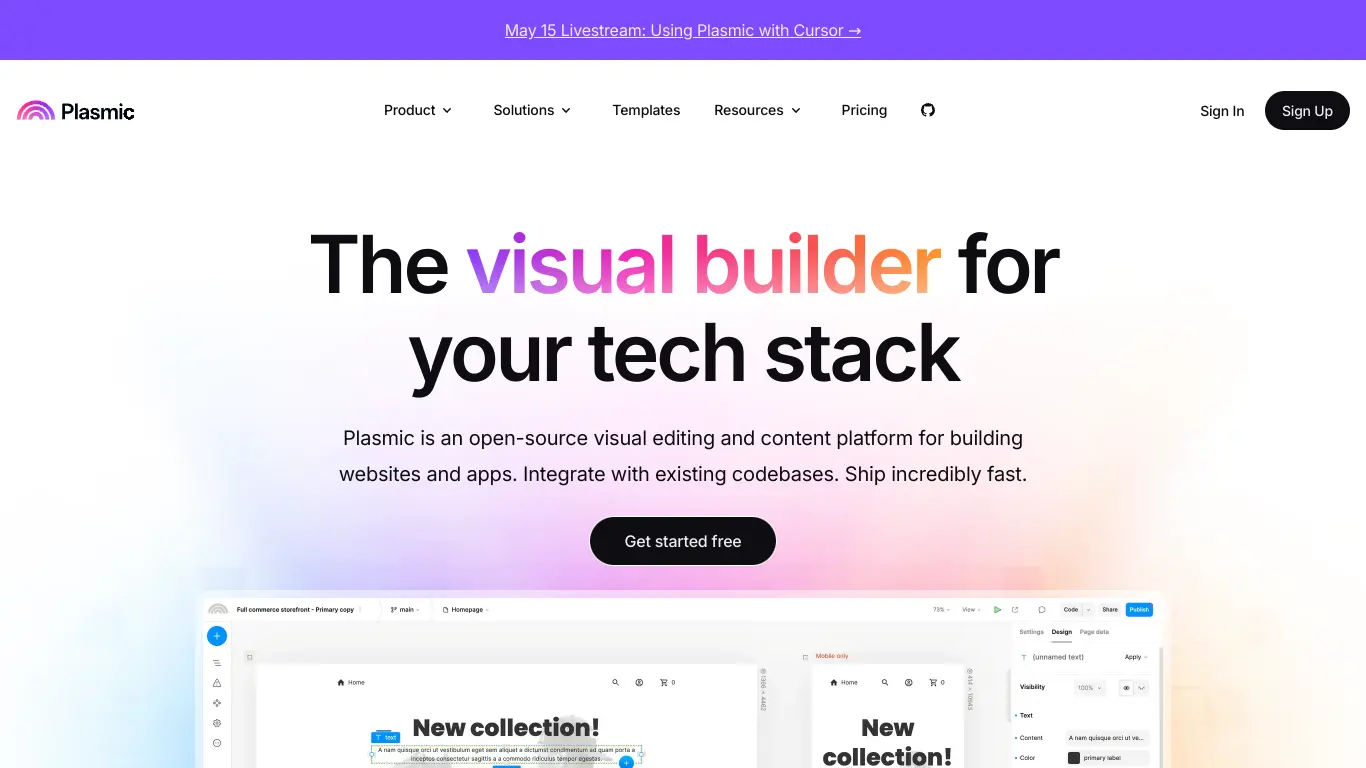
Plasmic is a visual development platform that generates React code, enabling faster UI creation while maintaining code quality.
Introduction to Plasmic
In today’s digital landscape, creating engaging, responsive, and visually appealing web applications is more important than ever. Whether you’re a seasoned developer or a no-code enthusiast, finding the right tools to bring your vision to life can be challenging. That’s where Plasmic comes in – a powerful visual builder that’s changing how we approach web development.
What is Plasmic and its Purpose?
Plasmic is a visual design and development platform that bridges the gap between designers and developers. It allows users to create and iterate on web interfaces without writing code, while still maintaining the flexibility and power that developers need. Unlike traditional website builders, Plasmic generates clean, production-ready code that integrates seamlessly with modern frameworks like React, Next.js, and Gatsby.
At its core, Plasmic’s purpose is to accelerate the UI development process by providing a visual canvas where design becomes code. It eliminates the traditional handoff between design and development teams, reducing friction and allowing for faster iterations. With Plasmic, what you see is exactly what you get, but with the added benefit of professional-quality code under the hood.
Who is Plasmic Designed For?
Plasmic caters to a diverse audience, making it a versatile tool for different stakeholders in the development process:
- Developers who want to accelerate UI implementation without sacrificing code quality or control
- Designers who wish to create functional prototypes that can be directly used in production
- Product teams looking to iterate quickly on user interfaces
- Marketing teams who need to update landing pages and content without developer involvement
- Agencies building client websites who want to deliver results faster
- No-code enthusiasts who want to create professional websites without coding
The platform is particularly valuable for teams working with React-based frameworks, as it generates clean React code that developers can easily work with.
Getting Started with Plasmic: How to Use It
Getting started with Plasmic is straightforward, even for those new to visual builders. Here’s a simple step-by-step process:
- Sign up for an account at Plasmic’s website
- Create a new project by clicking the “+” button in your dashboard
- Choose your framework (React, Next.js, or others)
- Use the visual editor to design your interface by dragging and dropping components
- Customize styles and interactions using the properties panel
- Add content and functionality through Plasmic’s component system
- Preview your creation in real-time
- Publish or export your code for integration with your codebase
Plasmic offers excellent documentation and tutorials to help new users get up to speed quickly. Their step-by-step guides cover everything from basic usage to advanced techniques, making the learning curve relatively gentle.
Plasmic’s Key Features and Benefits
Core Functionalities of Plasmic
Plasmic stands out in the crowded field of website and app builders due to its unique approach and powerful feature set:
- Visual Canvas: Design interfaces using an intuitive drag-and-drop editor that generates production-ready code
- Component System: Create reusable components that maintain consistency across your project
- Code Integration: Seamlessly integrate with React, Next.js, and other modern frameworks
- Responsive Design: Build fully responsive interfaces that look great on all devices
- Variants and States: Create interactive UI elements with different states and variations
- Design Systems: Import and work with existing design systems and component libraries
- Collaboration Tools: Work together with team members in real-time
- Version Control: Track changes and revert to previous versions when needed
- Headless CMS Integration: Connect to content management systems for dynamic content
- Global Styles: Manage typography, colors, and other design tokens at a global level
One of Plasmic’s most impressive features is its ability to generate clean, maintainable code that developers can work with directly, which sets it apart from many other visual builders.
Advantages of Using Plasmic
Using Plasmic offers numerous benefits for teams and individuals:
- Speed Up Development: Create UIs faster without writing CSS and HTML from scratch
- Bridge Design and Development: Eliminate the back-and-forth between designers and developers
- Maintain Code Quality: Generate clean, well-structured code that follows best practices
- Iterate Quickly: Make changes and see results instantly without lengthy build processes
- Empower Non-Developers: Allow team members without coding skills to contribute to UI development
- Ensure Visual Consistency: Maintain design system compliance across your application
- Reduce Technical Debt: Avoid unmaintainable HTML and CSS with Plasmic’s structured approach
- Future-Proof Projects: As web standards evolve, Plasmic keeps your code up-to-date
- Access to Premium Components: Use pre-built components to accelerate development further
The platform’s focus on developer experience alongside visual design makes it particularly valuable for teams striving to balance speed and quality.
Main Use Cases and Applications
Plasmic’s flexibility lends itself to a variety of use cases:
🌐 Marketing Websites and Landing Pages: Create high-converting landing pages quickly
📱 Web Applications: Design complex user interfaces for web applications
🧩 Component Libraries: Develop and document reusable component systems
🔄 Prototyping: Build functional prototypes that can evolve into production code
✏️ Content Management: Create editable regions for non-technical team members
🛍️ E-commerce: Design product pages and checkout flows for online stores
🚀 Startups: Rapidly iterate on MVPs without extensive development resources
🏢 Enterprise Applications: Create consistent interfaces across large applications
Plasmic particularly shines when used for projects that require both design flexibility and code quality, especially when multiple stakeholders need to collaborate on the UI.
Exploring Plasmic’s Platform and Interface
User Interface and User Experience
Plasmic’s interface strikes a balance between simplicity and power. The workspace is divided into several key areas:
Canvas: The central area where you visually design your interface
Components Panel: A library of available components and elements
Properties Panel: Controls for styling and configuring selected elements
Layers Panel: A hierarchical view of your project’s structure
Code Panel: View and edit the generated code when needed
The UI follows modern design principles with a clean, intuitive layout that makes it accessible even to those new to visual builders. The real-time rendering provides immediate feedback as you work, eliminating guesswork.
Plasmic’s user experience focuses on reducing friction in the design-to-code process. Common tasks are streamlined through shortcuts and smart defaults, while more advanced features remain accessible but don’t overwhelm new users.
Platform Accessibility
Plasmic is a web-based application, making it accessible from any modern browser without requiring installation. This cloud-based approach ensures:
- Cross-platform compatibility (Windows, macOS, Linux)
- Automatic updates with new features and improvements
- Consistent experience across different devices
- Easy team onboarding without complex setup
The platform also offers various ways to interact with your projects:
- Studio: The main web-based visual editor
- CLI: Command-line tools for developers
- API: Programmatic access for advanced integrations
- NPM Packages: Libraries for integrating Plasmic with your codebase
This multi-faceted approach ensures that Plasmic can fit into different workflows and accommodate various technical preferences.
Plasmic Pricing and Plans
Subscription Options
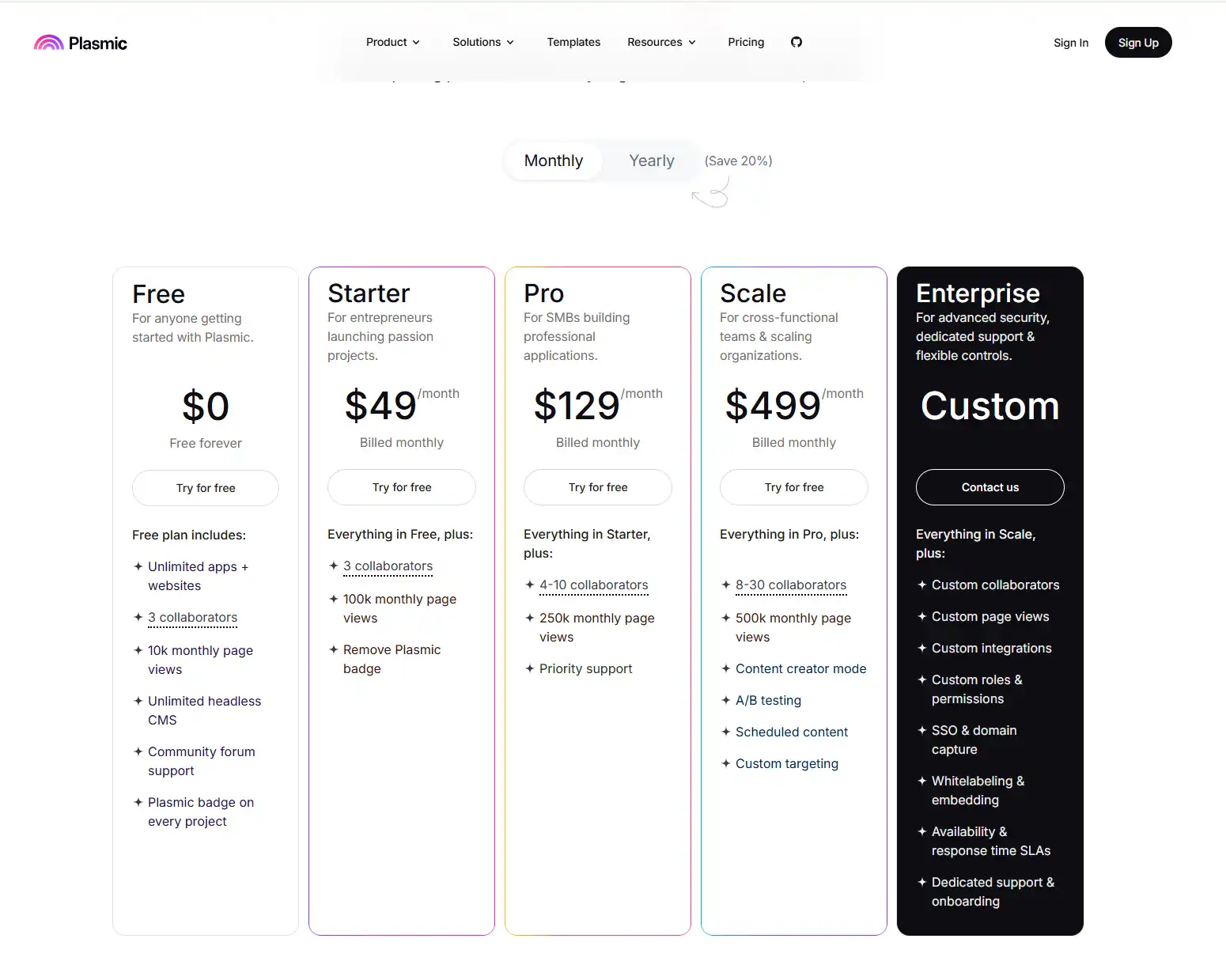
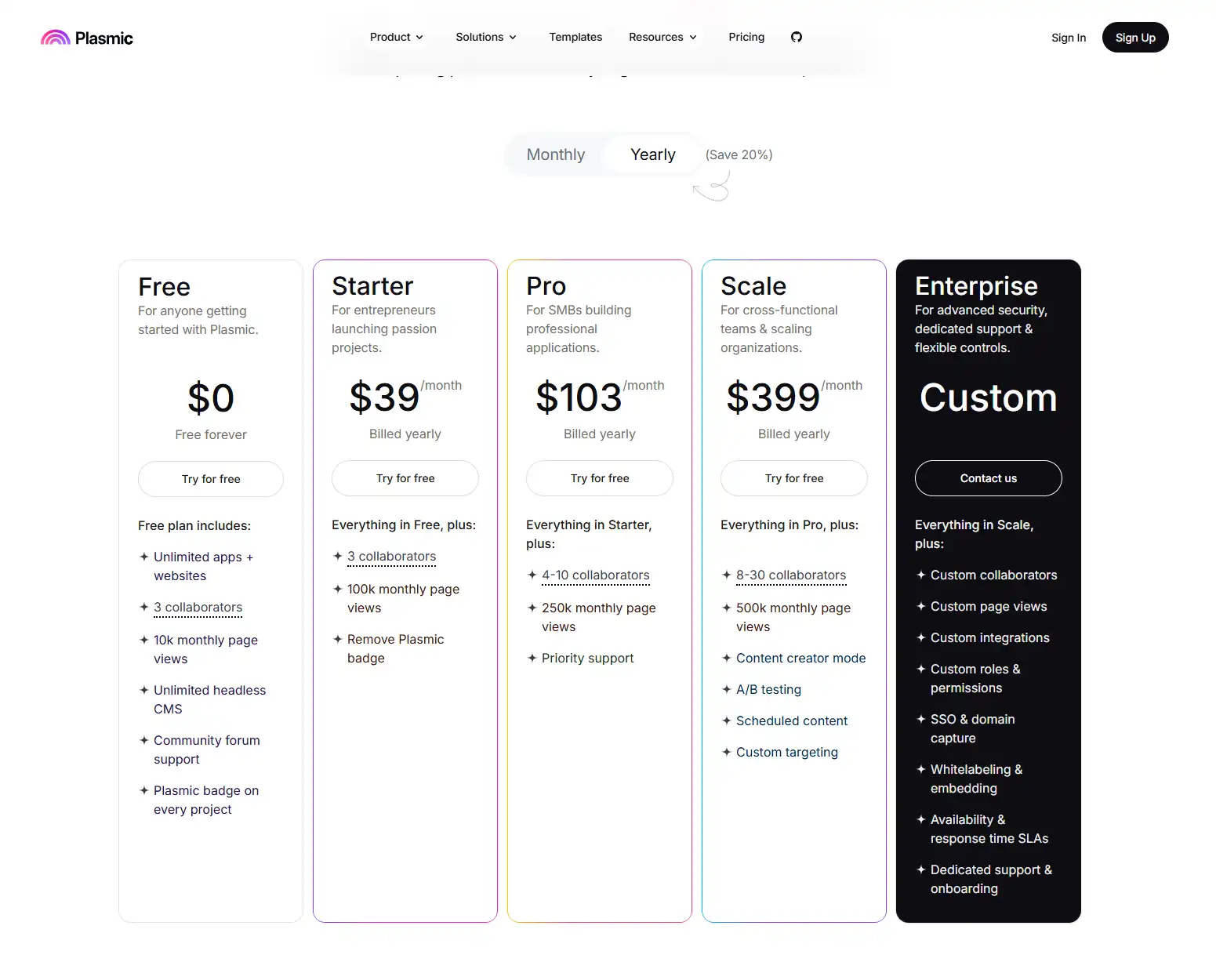
Plasmic offers a tiered pricing structure to accommodate different needs and scales:
Plasmic Reviews and User Feedback
Pros and Cons of Plasmic
Based on user feedback across various platforms, here’s a balanced view of Plasmic’s strengths and limitations:
Pros:
- ✅ High-quality code output that developers appreciate
- ✅ Seamless integration with React ecosystem
- ✅ Intuitive visual interface with real-time preview
- ✅ Excellent for collaborative workflows
- ✅ Strong support for responsive design
- ✅ Regular updates and new features
- ✅ Good documentation and learning resources
Cons:
- ❌ Learning curve for non-technical users
- ❌ Limited third-party integrations compared to some competitors
- ❌ Performance can slow with very complex projects
- ❌ Custom code integration requires some technical knowledge
- ❌ Some advanced features only available on higher-tier plans
User Testimonials and Opinions
From various review sites and social media, here are some representative user opinions:
“Plasmic has completely transformed how our team collaborates on UI. Designers can now create components that developers can use directly, cutting our iteration time in half.” – Sarah T., Product Manager
“As a React developer, I was skeptical about visual builders, but Plasmic generates code I’m not embarrassed to work with. It’s become an essential part of our toolkit.” – Michael R., Senior Frontend Developer
“There’s definitely a learning curve if you’re coming from more basic website builders, but once you get the hang of Plasmic’s component approach, it’s incredibly powerful.” – Jennifer L., Designer
“We evaluated several visual builders for our agency, and Plasmic stood out for its clean code output and React integration. It’s not perfect, but it’s the best option for our tech stack.” – David K., Agency Owner
The consensus among users appears to be that Plasmic excels for teams working with React and similar frameworks, especially when both designers and developers need to collaborate closely.
Plasmic Company and Background Information
About the Company Behind Plasmic
Plasmic was founded by Yang Zhang and Chung Wu, who previously worked at companies like Google and Facebook. Their experiences with the challenges of design-to-code workflows inspired them to create a solution that would address the pain points they had encountered firsthand.
The company has secured venture capital funding to support its development, with investors recognizing the potential to transform how digital products are built. Plasmic maintains a focus on the developer experience while making design more accessible, reflecting the founders’ backgrounds in both design and engineering.
Since its founding, Plasmic has grown its team and user base steadily, with a community of developers and designers embracing its approach to visual development. The company maintains an active presence in developer communities and regularly contributes to open-source projects related to its ecosystem.
Plasmic Alternatives and Competitors
Top Plasmic Alternatives in the Market
Several platforms compete with Plasmic in the visual development space, each with its own strengths:
- Webflow: A comprehensive visual development platform with a stronger focus on standalone websites and CMS capabilities
- Framer: Design-focused platform with prototyping and website building capabilities
- Bubble: Full-stack no-code platform for building web applications with backends
- Wix: User-friendly website builder with extensive templates and plugins
- Figma + Locofy: Design in Figma and convert to code
- BuilderIO: Visual CMS for creating and optimizing digital experiences
- Pagedraw: React UI builder focused on developer workflows
Plasmic vs. Competitors: A Comparative Analysis
Here’s how Plasmic stacks up against some key competitors:
| Feature | Plasmic | Webflow | Framer | Builder.io |
|---|---|---|---|---|
| Target Users | Dev teams & designers | Designers & marketers | Designers & prototypers | Developers & marketers |
| Code Output | React, Next.js | HTML, CSS, JS | React | Framework agnostic |
| Learning Curve | Moderate | Steep | Moderate | Moderate |
| Developer Experience | Excellent | Good | Good | Excellent |
| CMS Capabilities | Limited | Extensive | Limited | Good |
| Pricing (Starting) | Free | $14/month | $15/month | Free |
| Enterprise Ready | Yes | Yes | Limited | Yes |
Plasmic differentiates itself through its strong focus on React ecosystem integration and developer-friendly code output. While solutions like Webflow offer more comprehensive built-in features for websites, Plasmic excels at creating components and interfaces that integrate seamlessly with existing codebases. This makes it particularly valuable for development teams working with React.
Plasmic Website Traffic and Analytics
Website Visit Over Time
Plasmic has seen steady growth in website traffic over the past year, reflecting increasing interest in visual development tools. According to SimilarWeb data, monthly visits have increased approximately 15-20% year-over-year, with notable spikes corresponding to product launches and feature announcements.
Geographical Distribution of Users
Plasmic’s user base is distributed globally, with the highest concentration in:
- 🇺🇸 United States (35%)
- 🇬🇧 United Kingdom (12%)
- 🇩🇪 Germany (8%)
- 🇮🇳 India (7%)
- 🇨🇦 Canada (6%)
- 🇦🇺 Australia (5%)
- 🇧🇷 Brazil (4%)
- Other countries (23%)
This distribution reflects Plasmic’s appeal across mature and emerging technology markets, with strong adoption in regions with active React development communities.
Main Traffic Sources
Plasmic acquires users through various channels, with the primary sources being:
- Organic Search: 42% (primarily through developer-focused keywords)
- Direct Traffic: 25% (indicating strong brand recognition)
- Referrals: 18% (from tech blogs, GitHub, and partner sites)
- Social Media: 10% (mainly Twitter and LinkedIn)
- Paid Search/Display: 5% (targeted developer campaigns)
The high percentage of organic and direct traffic suggests that Plasmic has established a solid reputation within the developer community, leading to word-of-mouth growth.
Frequently Asked Questions about Plasmic (FAQs)
General Questions about Plasmic
Q: Is Plasmic a no-code tool?
A: Plasmic can be used as a no-code tool, but it’s better described as a visual development platform that generates high-quality code. It bridges the gap between no-code solutions and traditional development.
Q: Do I need coding knowledge to use Plasmic?
A: Basic familiarity with web concepts will help, but you don’t need to write code to use Plasmic’s visual editor. However, to get the most out of integration with your codebase, some development knowledge is beneficial.
Q: Can Plasmic replace developers on my team?
A: Plasmic isn’t designed to replace developers but to make them more efficient by handling routine UI implementation tasks. It empowers designers to contribute more directly to the implementation process.
Feature Specific Questions
Q: Which frameworks does Plasmic support?
A: Plasmic primarily supports React, Next.js, and Gatsby. It can also be used with other frameworks through its HTML/CSS export options.
Q: Can I use my existing design system with Plasmic?
A: Yes, Plasmic allows you to import and use components from existing design systems and component libraries, making it adaptable to your current workflow.
Q: Does Plasmic work with responsive design?
A: Absolutely. Plasmic has robust support for responsive design, allowing you to create layouts that adapt to different screen sizes and devices.
Pricing and Subscription FAQs
Q: Can I use Plasmic for commercial projects on the free plan?
A: Yes, you can use Plasmic’s free plan for commercial projects. The main limitations are around private projects and team collaboration features.
Q: Is there a limit to how many projects I can create?
A: The free plan allows unlimited public projects but limits private projects. Higher-tier plans increase these limits.
Q: Do you offer discounts for startups or non-profits?
A: Plasmic occasionally offers special pricing for startups, educational institutions, and non-profit organizations. Contact their sales team for current offers.
Support and Help FAQs
Q: What kind of support does Plasmic offer?
A: Plasmic provides documentation, tutorials, community forums, and email support. Higher-tier plans include priority support and dedicated assistance.
Q: Is there a community for Plasmic users?
A: Yes, Plasmic has an active community forum and Discord server where users can share tips, ask questions, and connect with other users.
Q: How often is Plasmic updated?
A: Plasmic receives regular updates, typically every few weeks, adding new features and improvements based on user feedback.
Conclusion: Is Plasmic Worth It?
Summary of Plasmic’s Strengths and Weaknesses
Strengths:
- 🚀 Bridges the gap between design and development effectively
- 💻 Generates clean, maintainable React code
- 🔄 Facilitates faster iteration on user interfaces
- 👥 Promotes collaboration between designers and developers
- 📱 Excellent support for responsive design
- 🧩 Component-based approach aligns with modern development practices
Weaknesses:
- 📊 Less suitable for complex data-driven applications without developer involvement
- 🔍 Steeper learning curve compared to simple website builders
- 🔌 Integration with non-React frameworks is more limited
- 💰 Some advanced features require paid plans
Final Recommendation and Verdict
Plasmic represents a significant evolution in the visual development space, particularly for teams working with React and similar frameworks. Its focus on generating clean, developer-friendly code while providing an intuitive visual interface makes it a standout choice for modern web development workflows.
For development teams looking to accelerate UI implementation without sacrificing code quality, Plasmic offers exceptional value. The platform is particularly worth considering if:
- Your team works with React, Next.js, or similar frameworks
- Collaboration between designers and developers is a priority
- You need to maintain consistent design systems across projects
- You want to empower non-developers to contribute to the UI
While not a perfect solution for every use case – particularly those requiring complex backend logic or non-React frameworks – Plasmic excels at its core purpose: making UI development faster and more collaborative without compromising on quality.
With a generous free tier that allows you to evaluate the platform thoroughly before committing to paid plans, Plasmic presents a low-risk opportunity to potentially transform your development workflow. For many teams, the productivity gains and improved collaboration will easily justify the investment in higher-tier plans as projects grow in scope and complexity.
In an increasingly competitive digital landscape where both speed and quality matter, Plasmic provides a compelling solution that deserves serious consideration.