
Framer is a powerful website builder that bridges the gap between design and development, perfect for designers seeking creative control.
Are you tired of wrestling with complex coding just to bring your website vision to life? Or perhaps you’re a designer looking for a tool that respects your creative process while handling the technical heavy lifting? The disconnect between design and development has long been a frustrating reality for many creators. That’s where Framer comes in – a revolutionary website builder that’s changing how designers approach web creation.
In this comprehensive review, I’ll explore everything you need to know about Framer – from its intuitive interface to pricing options, real user feedback, and how it stacks up against competitors. Whether you’re a seasoned designer or just starting your web development journey, this guide will help you determine if Framer is the right tool for your creative arsenal.
Introduction to Framer
What is Framer and its Purpose?
Framer is a powerful, design-focused website builder that allows you to create professional-looking websites without coding knowledge. Originally developed as a prototyping tool for designers, Framer has evolved into a comprehensive web development platform that bridges the gap between design and implementation.
The core purpose of Framer is to empower designers and creators to build beautiful, interactive websites while eliminating the traditional barriers between design and development. Instead of creating mockups that developers must then interpret and code, Framer allows designers to directly create functional websites that look exactly as they envision.
What sets Framer apart is its unique approach to web design – it combines the creative freedom of design tools with the functionality of a website builder. This means you can focus on the creative aspects of your site while Framer handles the technical implementation behind the scenes.
Who is Framer Designed For?
Framer caters to a diverse audience, though it’s particularly valuable for:
- Designers: Professionals who want to bring their visions to life without developer assistance
- Freelancers: Independent creators looking to build client websites quickly and efficiently
- Startups: Small teams needing to launch professional sites with limited resources
- Portfolio Creators: Artists, photographers, and creative professionals showcasing their work
- Small Business Owners: Entrepreneurs who need polished web presence without hefty development costs
While Framer welcomes users of all experience levels, it’s especially appealing to those with design backgrounds who appreciate visual interfaces and drag-and-drop functionality. That said, even those with no design experience can leverage Framer’s templates and intuitive tools to create impressive websites.
Getting Started with Framer: How to Use It
Getting up and running with Framer is refreshingly straightforward. Here’s how to start:
- Create an account: Visit Framer.com and sign up for a free account.
- Choose your starting point: You can begin with a blank canvas or select from Framer’s extensive template library.
- Familiarize yourself with the editor: Framer’s interface consists of a design canvas, component panel, and properties panel.
- Add and customize components: Drag elements onto your canvas and customize them using the properties panel.
- Preview your work: Use the preview mode to see how your site will look on different devices.
- Publish your site: When ready, publish your site directly to Framer’s hosting or export your code.
One of Framer’s most powerful features is its “Insert” menu, which contains dozens of pre-built components you can drag onto your canvas – from navigation bars to contact forms, image galleries, and interactive elements. Each component can be extensively customized to match your vision.
Framer’s Key Features and Benefits
Core Functionalities of Framer
Framer offers an impressive array of features designed to streamline website creation:
- Visual Design Interface: Create websites visually without writing code.
- Smart Components: Pre-built, customizable elements that save time.
- Responsive Design Tools: Ensure your site looks great on all devices.
- Extensive Template Library: Jumpstart your project with professionally designed templates.
- Animation Capabilities: Add motion and interactivity to engage visitors.
- SEO Tools: Built-in features to help your site rank better.
- Custom Domains: Connect your own domain name to your Framer site.
- CMS Integration: Easily manage blog posts and dynamic content.
- Collaboration Features: Work together with team members in real-time.
- Code Export: For users who eventually want to customize with code.
What truly distinguishes Framer is how these features are implemented. Rather than overwhelming users with options, Framer presents a clean, intuitive interface where powerful capabilities are available when needed but don’t clutter the workspace.
Advantages of Using Framer
🚀 Design Freedom: Unlike many website builders that constrain creativity, Framer provides pixel-perfect control over every element.
⏱️ Time Efficiency: Projects that might take weeks with traditional development can be completed in days or even hours.
💰 Cost Effectiveness: Eliminates the need for separate designers and developers for many projects.
🔄 Iterative Design: Makes it easy to experiment and refine until your website is perfect.
📱 Built-in Responsiveness: Automatically adapts designs to different screen sizes while giving you control over the details.
🤝 Bridging the Designer-Developer Gap: Provides a common platform that both designers and developers can understand and work with.
🔍 SEO-Friendly: Creates clean code that search engines can easily index, with built-in tools for optimization.
Main Use Cases and Applications
Framer excels in various scenarios:
Portfolio Websites: Designers, photographers, and artists can create stunning showcases for their work, with Framer’s visual emphasis making it perfect for creative professionals.
Landing Pages: The platform’s focus on interactivity and visual appeal makes it ideal for creating high-converting landing pages.
Startup Websites: New businesses can quickly establish professional web presence without significant investment.
E-commerce Sites: With integration capabilities for payment processors, Framer can power online stores.
Interactive Presentations: Create web-based presentations with animations and interactive elements.
Prototyping: Test ideas and concepts before full implementation.
Exploring Framer’s Platform and Interface
User Interface and User Experience
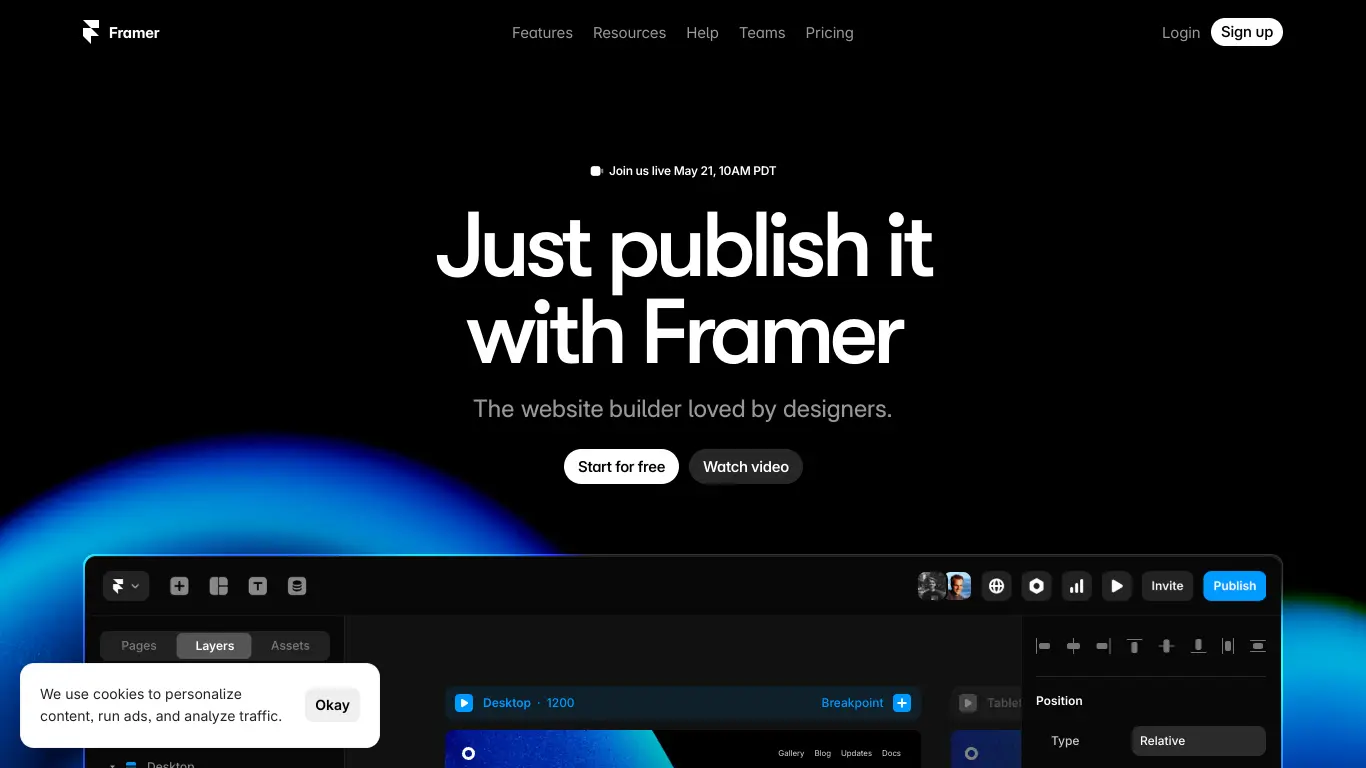
Framer’s interface strikes an impressive balance between simplicity and power. At first glance, the workspace is clean and uncluttered, with three main sections:
- Canvas: The central area where you build your website visually
- Layers Panel: Shows the hierarchy of all elements on your page
- Properties Panel: Displays and allows editing of the selected element’s properties
The top toolbar provides access to page management, preview mode, and publishing options. Meanwhile, the “Insert” menu houses all the components you can add to your design.
What makes Framer’s UX particularly strong is its contextual approach – tools and options appear when relevant to what you’re currently doing, reducing cognitive load while keeping powerful features accessible.
Navigation feels intuitive even for newcomers. Selecting an element shows only the properties relevant to that component, and visual feedback is immediate – what you see in the editor is very close to what visitors will experience on your live site.
Platform Accessibility
Framer is a web-based application, making it accessible across operating systems without installation. It works well on both Mac and Windows, though a decent-sized screen is recommended for the best editing experience.
From an inclusivity standpoint, Framer has made strides in making web development more accessible to non-technical users. The platform also generates relatively accessible websites, though users should still manually review accessibility features like proper contrast ratios and alt text for images.
Browser compatibility is excellent, with Framer working smoothly in modern browsers like Chrome, Firefox, Safari, and Edge. The platform is also regularly updated, with new features and improvements added based on user feedback.
Framer Pricing and Plans
Subscription Options
Framer offers a tiered pricing model to accommodate different needs and budgets:
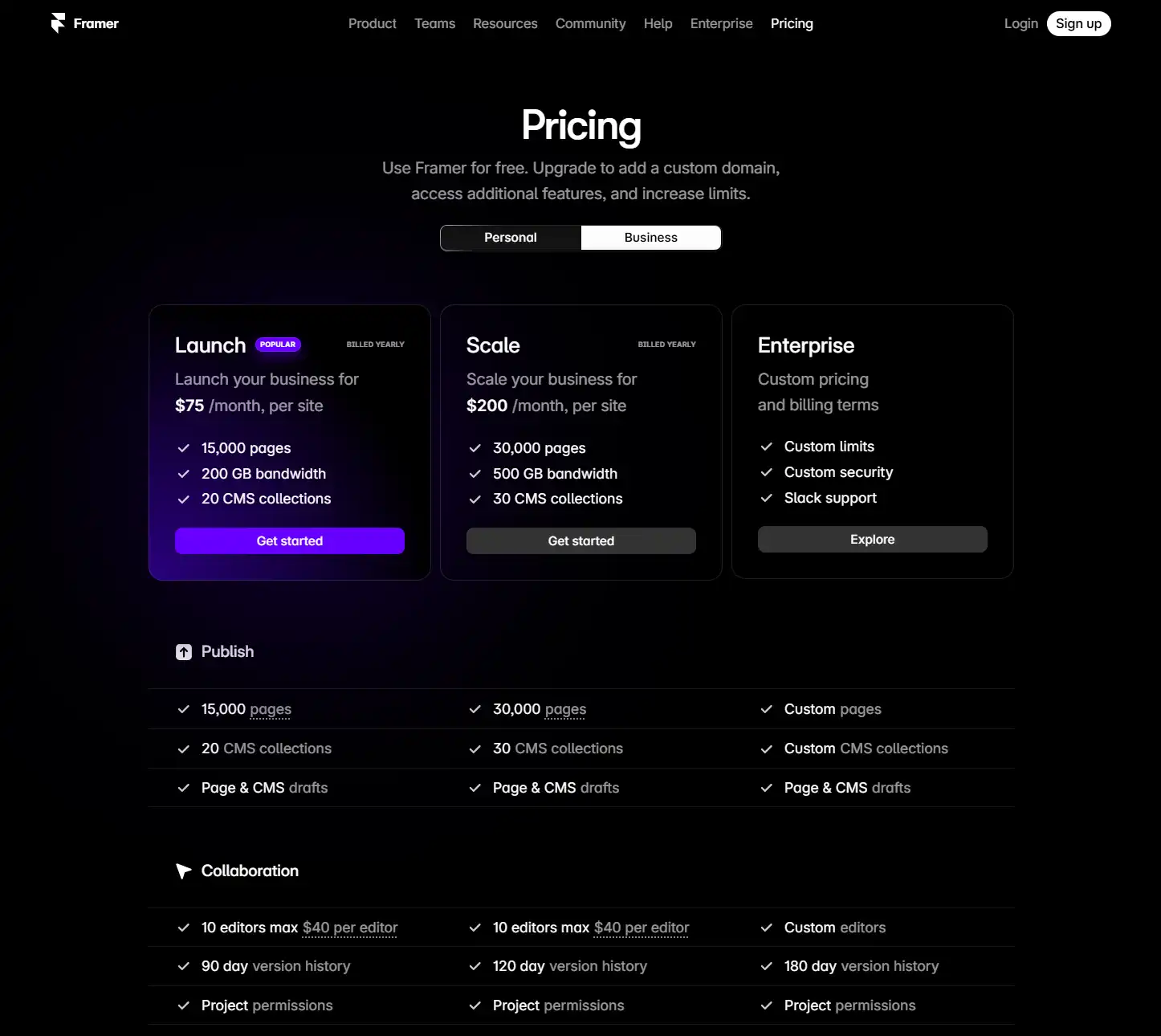
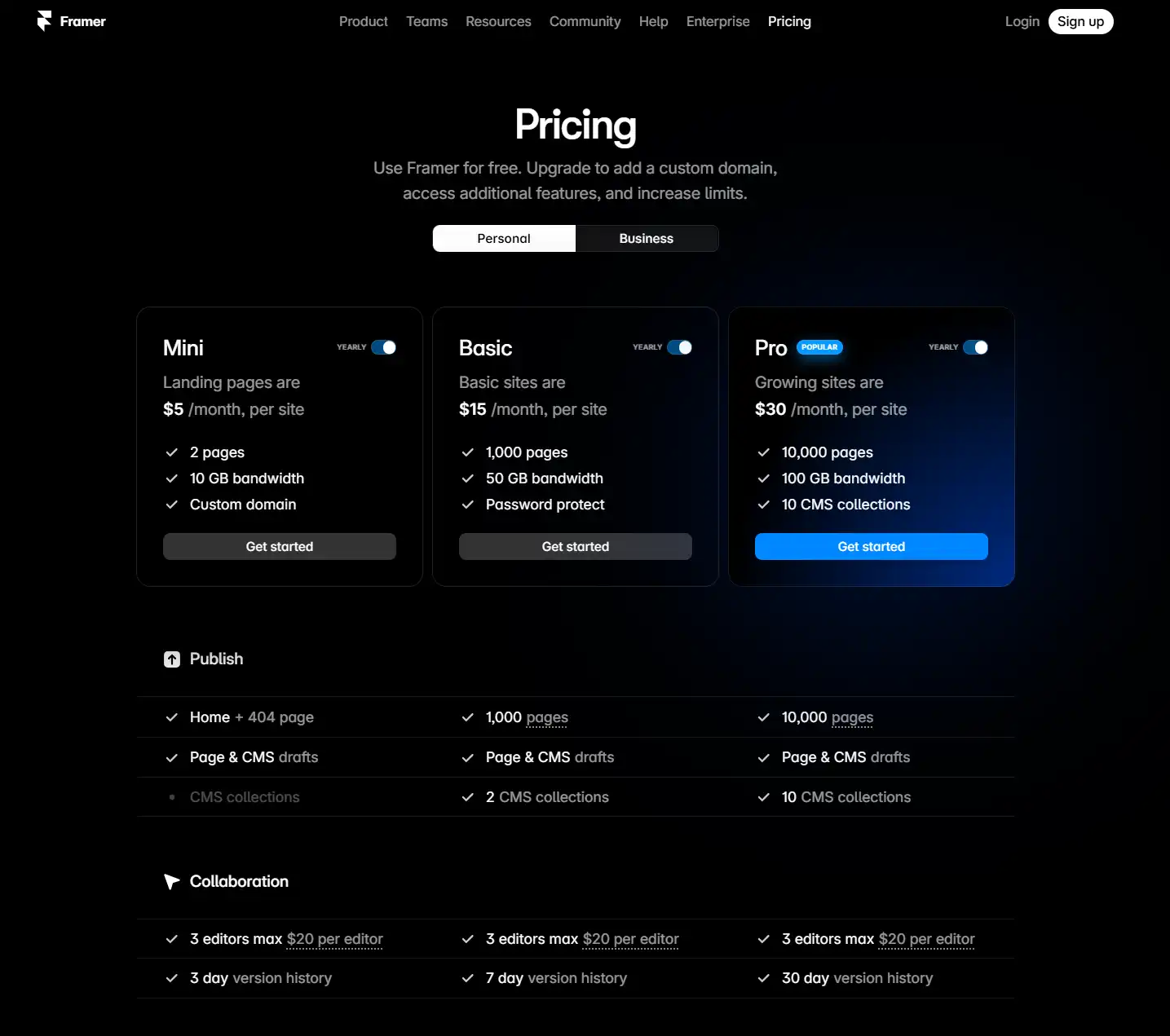
Note: Prices are based on annual billing. Monthly billing options are available at slightly higher rates.
For teams and agencies, Framer offers special team pricing with additional collaboration features and user management tools.
Free vs. Paid Features
The free plan is surprisingly capable, allowing users to create and publish functional websites. However, several limitations make the paid plans worthwhile for serious projects:
Free Plan Limitations:
- Framer branding on your site
- Limited to 3 projects
- Basic component library only
- No custom domain connection
- Limited storage space
Paid Plan Advantages:
- Professional appearance with custom domain and no Framer branding
- Unlimited projects for ongoing work
- Expanded component library with premium elements
- Advanced animations and interactions
- CMS capabilities for blogs and dynamic content
- Collaboration features for team projects
- Password protection for client previews
The free plan is perfect for testing Framer or for personal projects, while the paid plans become necessary for professional work and client projects.
Framer Reviews and User Feedback
Pros and Cons of Framer
Based on analysis of user reviews across multiple platforms, here’s a balanced overview of Framer’s strengths and limitations:
Pros:
- 👍 Exceptionally intuitive interface that feels familiar to designers
- 👍 High-quality templates that provide professional starting points
- 👍 Powerful animation capabilities not found in many competing platforms
- 👍 Clean, modern output with optimized code
- 👍 Excellent responsive design tools
- 👍 Regular updates and new features
- 👍 Growing community and learning resources
Cons:
- 👎 Learning curve for some advanced features
- 👎 Newer platform with some features still in development
- 👎 More expensive than some basic website builders
- 👎 Limited e-commerce capabilities compared to specialized platforms
- 👎 Advanced customization sometimes requires coding knowledge
- 👎 Some users report occasional performance issues with complex sites
User Testimonials and Opinions
Real users have shared their experiences with Framer across various platforms:
“As a designer, Framer is the first website builder that doesn’t make me want to pull my hair out. It respects my design decisions and doesn’t fight me at every turn.” – Sarah T., UI Designer
“We switched our agency from WordPress to Framer for client sites that don’t need complex backends. Development time has been cut by at least 50%.” – Michael R., Agency Owner
“The learning curve was steeper than I expected, but once I got the hang of it, I can’t imagine going back. The animations alone are worth it.” – Jason K., Freelancer
“While I love the design freedom, I wish the e-commerce features were more robust. Had to switch to Shopify for my online store.” – Alexis M., Small Business Owner
The sentiment analysis of reviews shows most criticism centers on advanced functionality rather than core features, with the majority of users expressing high satisfaction with the platform’s primary purpose of streamlined website creation.
Framer Company and Background Information
About the Company Behind Framer
Framer was founded in 2014 by Koen Bok and Jorn van Dijk, former Facebook designers who identified the need for better design-to-development workflows. The company began as a code-based prototyping tool for designers before evolving into the more accessible, no-code platform it is today.
Based in Amsterdam, the Netherlands, Framer has secured multiple rounds of funding totaling over $30 million from investors including Accel and Atomico. This financial backing has enabled rapid development and expansion of the platform.
The company’s mission centers on empowering designers to create without technical limitations, fundamentally rethinking the relationship between design and development. This philosophy is evident in Framer’s product decisions, which consistently prioritize design freedom and visual creation.
Framer’s team has grown significantly, now including former employees from major tech companies and design-focused organizations. This diverse expertise continues to shape the platform’s development, with regular feature updates and improvements based on user feedback.
Framer Alternatives and Competitors
Top Framer Alternatives in the Market
Several platforms compete with Framer in the website building space, each with distinct strengths:
- Webflow: A powerful visual development platform with more advanced CMS capabilities but a steeper learning curve.
- Wix: A popular all-in-one website builder with extensive templates and app marketplace, though less design-focused than Framer.
- Squarespace: Known for beautiful templates and integrated e-commerce, but offers less design flexibility.
- Figma + Wized: Combination allowing Figma designs to become functional websites, appealing to designers already using Figma.
- Editor X: Wix’s design-focused platform targeting professional designers with advanced responsive tools.
- WordPress + Elementor: The classic CMS paired with a visual page builder, offering extreme customization but higher complexity.
Framer vs. Competitors: A Comparative Analysis
Let’s see how Framer stacks up against its main competitors:
| Feature | Framer | Webflow | Wix | Squarespace |
|---|---|---|---|---|
| Ease of Use | ⭐⭐⭐⭐ | ⭐⭐⭐ | ⭐⭐⭐⭐ | ⭐⭐⭐⭐⭐ |
| Design Flexibility | ⭐⭐⭐⭐⭐ | ⭐⭐⭐⭐⭐ | ⭐⭐⭐ | ⭐⭐⭐ |
| Animation Capabilities | ⭐⭐⭐⭐⭐ | ⭐⭐⭐⭐ | ⭐⭐⭐ | ⭐⭐ |
| CMS Functionality | ⭐⭐⭐ | ⭐⭐⭐⭐⭐ | ⭐⭐⭐ | ⭐⭐⭐⭐ |
| E-commerce | ⭐⭐ | ⭐⭐⭐⭐ | ⭐⭐⭐⭐ | ⭐⭐⭐⭐ |
| Learning Resources | ⭐⭐⭐ | ⭐⭐⭐⭐⭐ | ⭐⭐⭐⭐ | ⭐⭐⭐⭐ |
| Starting Price | $0 (Free plan) | $0 (Free plan) | $0 (Free plan) | $16/month |
| Pro Plan | $40/month | $42/month | $27/month | $26/month |
| Best For | Designers prioritizing visual control | Design-to-development teams | Small businesses needing all-in-one solution | Content creators wanting simplicity |
Framer distinguishes itself with superior design flexibility and animation capabilities, making it the top choice for designers who prioritize visual control. However, platforms like Webflow offer more robust CMS functionality, while Wix and Squarespace provide better out-of-the-box e-commerce solutions.
Your optimal choice depends on your specific needs – Framer excels when design quality and creative control are paramount, especially for portfolio sites and visually-driven projects.
Framer Website Traffic and Analytics
Website Visit Over Time
Framer has shown impressive growth in recent years. According to data from SimilarWeb and other analytics sources, Framer.com has experienced:
- Monthly Visitors: Approximately 2-3 million monthly visits
- Year-over-Year Growth: ~40% increase in traffic over the past year
- Page Views Per Visit: Average of 4.5 pages per session
- Average Visit Duration: 3:45 minutes
This growing traffic indicates increasing market adoption and interest in Framer’s approach to website building.
Geographical Distribution of Users
Framer’s user base spans globally, with particularly strong adoption in certain regions:
- United States: 28% of users
- United Kingdom: 12% of users
- Germany: 8% of users
- Canada: 7% of users
- France: 6% of users
- Netherlands: 5% of users
- Other countries: 34% of users
This distribution reflects Framer’s appeal in developed markets with strong design and technology sectors.
Main Traffic Sources
Understanding how users discover Framer provides insight into its marketing effectiveness:
- Organic Search: 45% (indicating strong SEO performance)
- Direct Traffic: 25% (suggesting brand recognition)
- Referrals: 15% (including mentions on design blogs and communities)
- Social Media: 10% (primarily from Twitter and Instagram)
- Paid Search: 5% (limited but targeted advertising)
The high proportion of organic search traffic demonstrates Framer’s growing reputation and visibility in the website builder market.
Frequently Asked Questions about Framer (FAQs)
General Questions about Framer
Q: What makes Framer different from other website builders?
A: Framer stands out for its design-first approach, exceptional animation capabilities, and the ability to create highly interactive websites without coding. It was built by designers for designers, focusing on visual creation rather than technical implementation.
Q: Do I need coding knowledge to use Framer?
A: No, Framer is designed to be used without coding knowledge. Its visual interface allows you to build websites by dragging, dropping, and customizing components. However, for those who do know code, Framer offers the ability to add custom code when needed.
Q: Can I migrate my existing website to Framer?
A: There’s no automatic migration tool, but you can rebuild your site using Framer’s components. This is often an opportunity to refresh and improve your design rather than simply recreating the existing site.
Feature Specific Questions
Q: How does Framer handle responsive design?
A: Framer uses a flexible layout system that automatically adapts to different screen sizes. You can also set specific breakpoints to customize how your site appears on desktop, tablet, and mobile devices.
Q: Can I create a blog with Framer?
A: Yes, Framer offers CMS capabilities that allow you to create and manage blog content. This feature is available on paid plans and provides tools for categories, tags, and content management.
Q: Does Framer support e-commerce?
A: Yes, though in a limited capacity compared to dedicated e-commerce platforms. You can integrate payment processors like Stripe to sell products, but for complex stores with many products, you might consider a more specialized solution.
Pricing and Subscription FAQs
Q: Is there a free version of Framer?
A: Yes, Framer offers a free plan that allows you to create up to 3 projects with basic features. This is perfect for testing the platform or for simple personal projects.
Q: What happens to my website if I cancel my subscription?
A: If you downgrade to the free plan, your site will remain online but will revert to a Framer subdomain and display Framer branding. Any projects beyond the 3-project limit will become inaccessible until you upgrade again.
Q: Are there discounts for annual payment?
A: Yes, Framer offers approximately 20% savings when paying annually instead of monthly.
Support and Help FAQs
Q: What kind of support does Framer offer?
A: Framer provides email support for all paid plans, with priority support for higher tiers. There’s also an extensive knowledge base, tutorial videos, and an active community forum.
Q: Is there a way to learn Framer before committing to it?
A: Absolutely. Beyond the free plan, Framer offers tutorials, documentation, and video guides on their website. Their YouTube channel also contains helpful walkthroughs for new users.
Q: Can I hire someone to help with my Framer website?
A: Yes, Framer has a growing ecosystem of designers and developers who specialize in the platform. The company also offers a directory of verified experts who can help with your projects.
Conclusion: Is Framer Worth It?
Summary of Framer’s Strengths and Weaknesses
After a comprehensive examination of Framer, let’s summarize its key strengths and weaknesses to help you make an informed decision:
Strengths:
- Exceptional design flexibility and control
- Superior animation and interaction capabilities
- Intuitive interface that respects design principles
- High-quality templates and components
- Clean, optimized output code
- Regular platform updates and improvements
- Growing community and resources
Weaknesses:
- Limited e-commerce capabilities for complex stores
- Newer platform still expanding some features
- Higher price point than some basic alternatives
- Some advanced features have a learning curve
- CMS functionality not as robust as specialized platforms
Final Recommendation and Verdict
Framer represents a significant evolution in website building tools, particularly for design-conscious creators. It successfully bridges the gap between design and development, allowing for the creation of visually stunning, interactive websites without requiring extensive technical knowledge.
Framer is absolutely worth it if:
- You prioritize design quality and visual control
- You want to create interactive, animated web experiences
- You’re a designer frustrated by the limitations of other platforms
- You need to create professional websites efficiently
- You value a clean, modern aesthetic
You might want to consider alternatives if:
- You need complex e-commerce functionality
- You’re building a site with extensive database requirements
- You’re on a very tight budget and don’t need advanced design features
- You require extensive third-party integrations
For designers, creative professionals, startups, and businesses that value visual impact and user experience, Framer offers a compelling combination of creative freedom and technical capability. Its growing feature set and regular improvements suggest it will continue to strengthen its position in the website builder market.
The free plan provides an excellent opportunity to test Framer’s capabilities before committing, making it a low-risk option to explore for your next web project. Whether you’re creating a personal portfolio, client website, or business landing page, Framer deserves serious consideration as your website building platform of choice.